Blog for Electronics world.
Car, Automobile, Automotive, Vehicle, Electronic circuit, digital project (includes source code) & also analog project are here.
Generation and implementation of sine wave table
Get link
Facebook
X
Pinterest
Email
Other Apps
-
You can download it in PDF format here: http://ifile.it/84hw0eg
My browser warns me that the link you have posted contains harmful software and it won't let me see it, even when I agree to the risk the URL won't load. Could you post the info here or fix the link? I would appreciate it very very much.
One label for this post is "First and Last," but the subject actually is "Last and First." In this case, the final pre- World War 2 Aston Martins and the postwar models when David Brown assumed ownership of the firm. General Aston Martin background is here , that of the postwar "DB1" (a retroactive designation) is here , and for the 1950-vintage DB2, here . Aside from modernized styling, postwar Astons featured the "A" form grille design that the marque has continued with detail variation until this day. But even that feature had prewar origin in the form of a prototype/concept car, the Aston Martin Atom that was first displayed in 1940. Gallery 1938 15/98 Sports Tourer - Bonhams photo An example of the last prewar Aston. Styling is 1933-ish, but still prevalent in late-1930s England. The grille design was abandoned following this model's end of production. 1939-1940 Aston Martin Atom prototype/concept - Bonhams photo The idea was to ex...
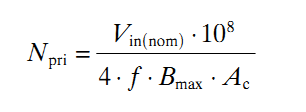
On different forums, I often find people asking for help in calculating the required turns for a ferrite transformer they are going to use in high-frequency/SMPS inverters. In a high-frequency/SMPS inverter, the ferrite transformer is used in the step-up/boost stage where the low voltage DC from the battery is stepped up to high voltage DC. In this situation, there are really only two choices when selecting topology – push-pull and full-bridge. For transformer design, the difference between a push-pull and a full-bridge transformer for same voltage and power will be that the push-pull transformer will require a center tap, meaning it will require twice the number of primary turns as the full-bridge transformer. Calculation of required turns is actually quite simple and I’ll explain this here. For explanation, I’ll use an example and go through the calculation process. Let’s say the ferrite transformer will be used in a 250W inverter. The selected topology is push-pull. The power source...
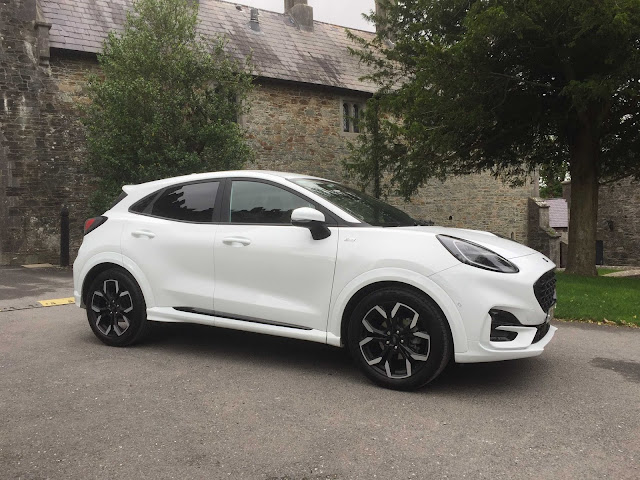
Ford Ireland is requesting the Government to extend the current VAT reduction to the end of March, writes Trish Whelan . Head of Ford Ireland, John Manning, says: “In this very tough environment, we need all the help we can get to boost vehicle sales and the continuation of the VAT reduction would be a great asset in this regard.” The standard rate of Irish VAT was temporarily reduced from 23pc to 21pc for a six-month period from 1 September 2020 to 28 February 2021. Since 1987 when the year-based car registration system was introduced, January has consistently been the busiest month for new car sales in Ireland. Not so this year, as the latest Government Covid-19 restrictions will curtail the normal business activities of car dealers across the country for at least the first four weeks of January and perhaps for even longer into February. John Manning supports the Government moves to curtain the spread of the virus. “It will be really tough on our business as new car sales will ...

My browser warns me that the link you have posted contains harmful software and it won't let me see it, even when I agree to the risk the URL won't load. Could you post the info here or fix the link?
ReplyDeleteI would appreciate it very very much.